Tax Exempt Sales
Report Parameters
|
Field |
Description |
|---|---|
|
Report Name |
The name of the report. |
|
Start Date |
The start date from when the data must be considered for generating the report. |
|
End Date |
The end date until when the data must be considered for generating the report. |
|
Report Category |
A list of all active category groups available in the property. Users can select multiple or all the category groups from the list to be displayed in the report generated. |
|
Category |
A list of all active retail categories available in the property. Users can select multiple or all the retail categories from the list to be displayed in the report generated. The retail categories appearing in the drop-down list are displayed based on the category groups selected in the Report Category field. |
Sample Report
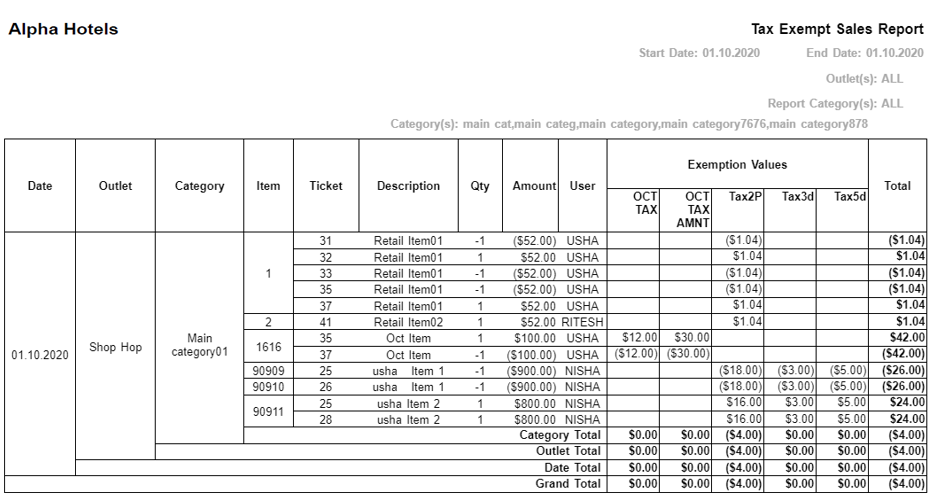
Report Fields
|
Field |
Description |
|---|---|
|
Date |
The dates of the transactions performed by exempting taxes displayed in the report generated. |
|
Outlet |
The outlets in which the transactions performed by exempting taxes have taken place. All the transactions displayed for the date under the respective outlets are grouped together. |
|
Category |
The category to which the items involved in the transactions performed by exempting taxes displayed in the report belong to. All the items belonging to the respective categories are grouped together. |
|
Item |
The item numbers of the items involved in the transactions performed by exempting taxes displayed in the report. |
|
Ticket |
The ticket numbers of the transactions performed by exempting taxes. |
|
Description |
The item description. |
|
Qty |
The number of items sold. The quantity is displayed in positive if the transaction performed by exempting taxes involves selling of items and in negative if the transaction performed by exempting taxes involves return of items. |
|
Sales Amount |
The discounted selling price of the item per quantity. The amount is displayed in positive if the transaction performed by exempting taxes involves selling of items and in negative if the transaction involves return of items. |
|
User |
The user associated with the transaction ticket. |
|
Exemption Values |
Displays the tax names associated with the respective transactions along with the exemption values configured under them in separate columns. The amount displayed is positive if the transaction performed by exempting taxes involves selling of items and negative if the transaction performed by exempting taxes involves return of items. |
|
Total |
The total sum of exemption values for the respective item. The amount is displayed positive if it is a sold item and negative if it is a return item. |
|
Category Total |
The total transaction value performed by exempting taxes of all the items for each category. |
|
Outlet Total |
The total transaction value performed by exempting taxes of all the items for each outlet. |
|
Date Total |
The total transaction value performed by exempting taxes of all the items for the respective dates. |
|
Grand Total |
The grand total of all the transaction value performed by exempting taxes of the items under each exemption taxes. |